
claude-code
Claude Code vs Cursor free: which AI coding workflow is actually useful?
A practical comparison of Claude Code and Cursor for developers who want AI help without wasting time, limits, or control.
My short opinion
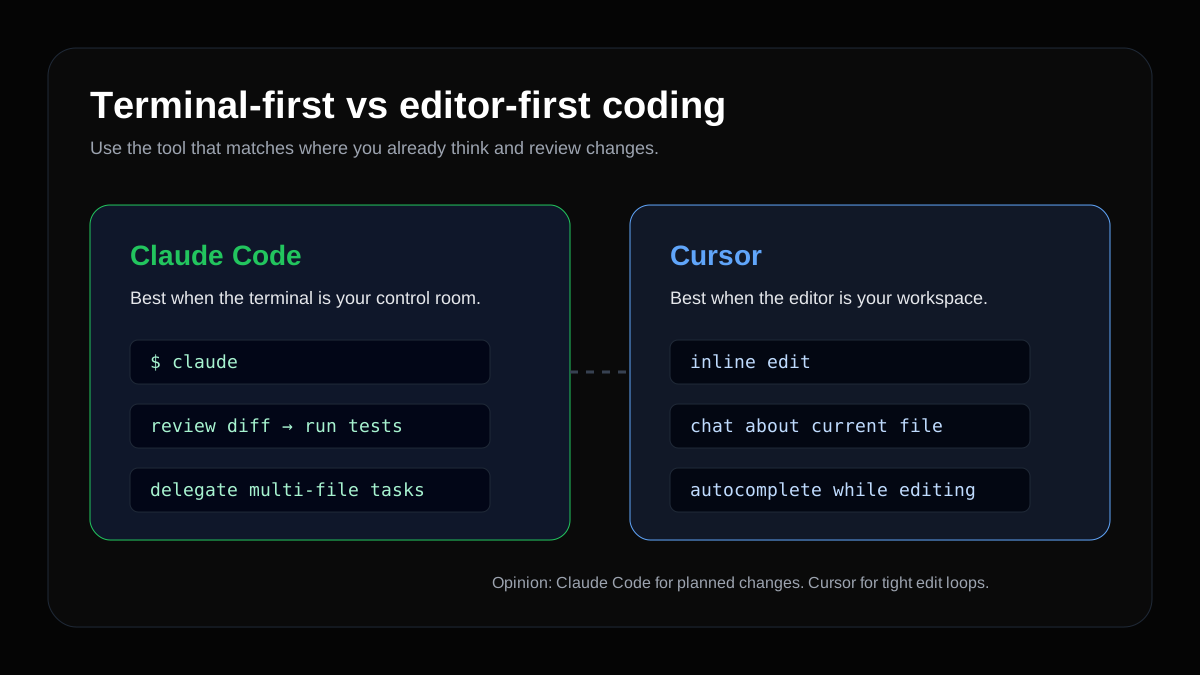
That does not mean Cursor is weak. The point is that the tools solve different problems. Cursor is an AI editor. Claude Code is a terminal agent. If you judge them as if they are the same product, you will choose badly.
The real difference is where you think
Claude Code lives in the terminal. That changes its behavior. It fits people who already run npm test, inspect git diff, search files, and treat a code change as a sequence of steps. You talk to it like you are assigning a task to a developer who needs to explore, propose, edit, and verify.
Cursor lives in the editor. It fits people who think while looking at the open file. You select a function, ask for a change, accept or reject a patch, tweak a component, rename a prop, or discuss the current file in a side chat. The loop is more visual, more immediate, and less formal.
In practice: if the task fits in one sentence and touches one file, Cursor is comfortable. If the task requires understanding the project before editing, Claude Code usually saves rework.
Free does not mean no cost
Free plans change. Limits change. Available models change. So the best decision is not "which tool gives me the most messages today?" A better decision is: "which tool wastes fewer attempts for the kind of work I actually do?"
There is a cost in limits, but there is also a cost in bad context. A vague Cursor prompt can produce five tiny edits that you have to undo. A task that is too broad in Claude Code can burn usage while trying to solve an unclear problem. In both cases, price is not the only issue; workflow discipline matters.
If you are using free or low-limit access, treat every request as if it needs to earn its place:
- explain the goal before asking for code;
- paste the real error, not a vague summary;
- ask for a plan before a large change;
- run tests after applying changes;
- read the diff before trusting the result.
Tutorial: first test with Claude Code
According to Anthropic's official docs, Claude Code requires Node.js 18+ and can be installed with npm. After installation, run claude doctor to check your setup.
npm install -g @anthropic-ai/claude-code
claude doctor
Create a small project so you can test safely:
mkdir test-claude-code
cd test-claude-code
npm init -y
echo "function add(a, b) { return a + b }" > math.js
claude
Inside Claude Code, do not start with "build me a full app." Start with a read-only request:
Explain this project, list the files, and suggest one simple first test. Do not edit files yet.
After it explains the project, ask for one small change:
Create a simple test for the add function and show me how to run it.
The value of this flow is control. First reading. Then plan. Then change. Then verification. When you jump straight to "do everything," it becomes harder to know whether the tool failed or whether the task was poorly framed.
Tutorial: first test with Cursor
Cursor makes more sense when you open a real project in the editor and work directly on files. A good first test is to pick a small function and ask for a localized improvement.
Create the same file:
mkdir test-cursor
cd test-cursor
npm init -y
echo "function add(a, b) { return a + b }" > math.js
Open the folder in Cursor. In math.js, select the function and ask for a specific edit:
Turn this function into a CommonJS export and add validation so it only accepts numbers.
Then ask the side chat for a test:
Create a math.test.js file using node:test that covers valid addition and invalid input.
Run it:
node --test
This is where Cursor shines: the edit is in front of you. You can accept chunks, adjust names, and quickly notice when the suggestion does not match the project's style.
Video comparison
Use videos as interface references, not permanent truth. AI coding tools change quickly. What matters is how the person prompts, how much context they provide, how they review changes, and whether they run tests.
When I would open Claude Code
I would open Claude Code for tasks that need a sequence:
| Task | Why Claude Code fits |
|---|---|
| Fixing a bug with a failing test | It can investigate, edit, and run commands |
| Refactoring multiple files | Terminal search and verification feel natural |
| Planning a feature | It handles scope and steps well |
| Reviewing a local diff | The command-line workflow fits |
| Documenting technical behavior | It can inspect files and summarize |
My favorite starting prompt:
Read the project, identify the relevant files for this task, and propose a short plan. Do not edit yet.
The "do not edit yet" part matters. It turns Claude Code into a reasoning tool before it becomes a writing tool. That reduces impulsive changes.
When I would open Cursor
I would open Cursor when the task is visual, local, or iterative:
| Task | Why Cursor fits |
|---|---|
| Adjusting a React component | You see the edit in the file |
| Tweaking UI copy | Fast to select and ask for variants |
| Writing a small function | Autocomplete helps the flow |
| Exploring an unknown file | Selection plus side chat helps |
| Refactoring one isolated block | Less overhead than a full agent |
My favorite Cursor prompt:
Rewrite only this section while keeping the public API and file style. Briefly explain what changed.
The phrase "only this section" prevents the tool from trying to fix the entire project when you only wanted to improve one function.
Where local AI fits
A small local model will not replace Claude Code or Cursor for complex work, but it is a useful cheap assistant:
ollama pull qwen2.5:1.5b
ollama run qwen2.5:1.5b "Explain this TypeScript error in plain English: <paste error>"
I would use local AI for:
- explaining error messages;
- drafting README text;
- summarizing logs;
- suggesting variable names;
- turning a rough idea into a checklist.
That saves paid or limited usage for tasks that require stronger reasoning.
My final matrix
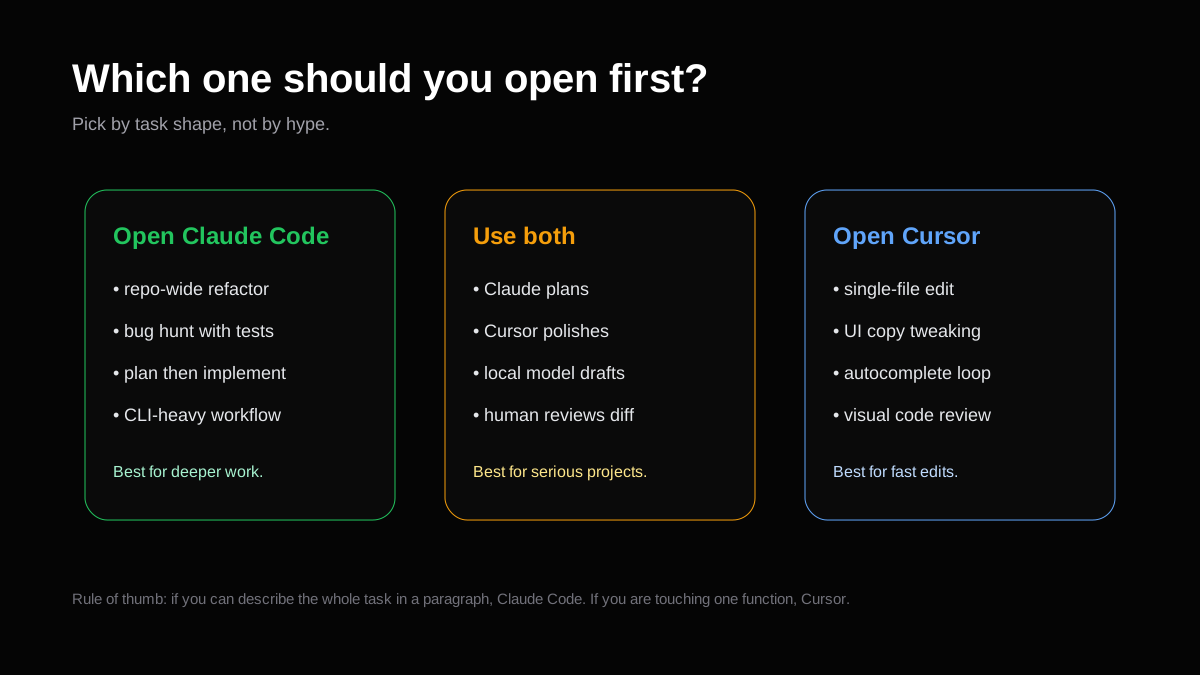
If you are a complete beginner, start with Cursor because the visual feedback helps. If you already use the terminal, Git, and tests every day, start with Claude Code. If you want real productivity, learn both and use each where it is strongest.
My preferred combination:
- Claude Code to understand the problem and draft a plan.
- Claude Code for multi-file changes with tests.
- Cursor for UI polish, copy, and small local edits.
- Ollama or another local model for cheap drafts and simple explanations.
- You reviewing every diff before trusting the result.
The mistake is looking for "the winner." The better move is building a workflow where each tool handles the part it is actually good at.